
The Organization Space is a specialized feed designed to give you a high-level view of the intelligence being gathered by your team. It consolidates information from various topics into one stream.
Locating the Space
-
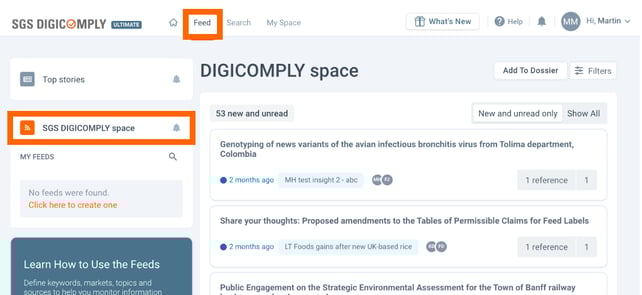
Navigate to the Feed tab in the top menu.
-
Look at the left-hand sidebar under "MY FEEDS".
-
Find the feed named after your company (e.g., "SGS Digicomply space").
How Content is Aggregated
This feed operates differently than standard regulatory feeds.
-
Content Source: It collects Signals from all the Insights you are currently subscribed to.
-
Sorting Order: Items are displayed based on the Date of Last Modification, ensuring the most recently updated discussions or signals appear at the top.
Filters & Notifications
You can customize how you interact with this data:
-
Filtering: Use the Filters button to narrow down the feed by specific Tags, Date Ranges, or properties.
-
Alerts: Click the Bell Icon next to the space name to configure email notifications. This ensures you are alerted whenever a new Signal is added to the collective space.
Create a report
In case you would like to prepare some reports on a regular basis you can add (filtered) Signals from this feed into a Dossier. You can learn more about this feature in How to create a report from Signals.
Discover our new onboarding platform full of video guides - SGS Academy!