
Just as you can collect individual posts, you can also collect entire Dossiers into an Insight. This allows you to consolidate all work related to a specific topic, market, or project in one accessible location.
Access the Share Menu
-
Navigate to the specific Dossier you wish to collect.
-
Open the dossier to view its details.
-
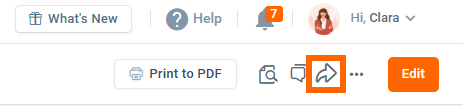
Locate the Share (Arrow) icon in the top-right toolbar (next to the "Edit" and "Print" buttons) and click it.

Select the Destination Insight
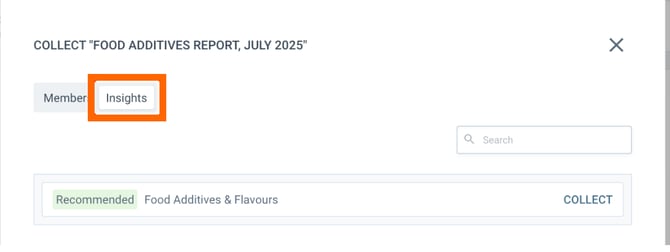
When the dialog box opens, it may default to the "Members" view.
-
Switch Tab: Click on the Insights tab at the top of the dialog.
-
Find Insight:
-
Recommended: The system may suggest relevant Insights automatically.
-
Search: Use the search bar to find a specific Insight by name.
-
-
Collect: Click the COLLECT button next to the target Insight.
👉Now you can follow the steps described in the article How to collect posts to Insight.