
1. Navigate to the 'Feed' page.

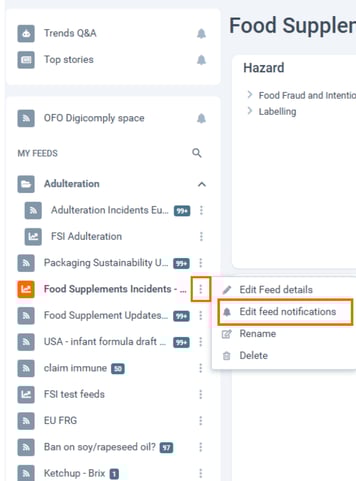
2. On the left side of the screen, you will see your List of Feeds. Click on the name of the feed you want to open.
3. Next to the feed name, there are three dots symbol which you can click on.
4. Select 'Edit Feed Notifications' to adjust your notification settings.
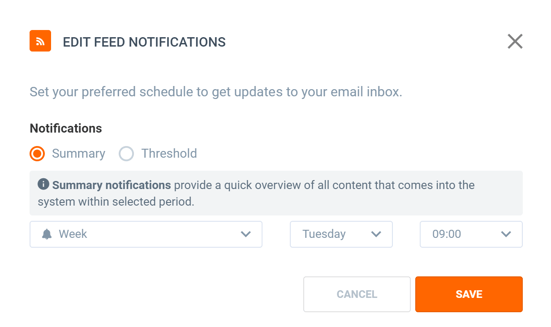
The following options are available:
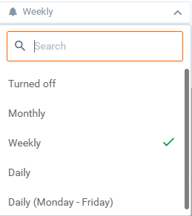
- Turned Off – disables notifications for this feed.
- Monthly – allows you to select a specific day of the month and time of day for notifications.
- Weekly – allows you to choose a specific day of the week and time of day for notifications.
- Daily – allows you to set a specific time of day for daily notifications.
- Daily (Monday–Friday) – allows you to set a specific time of day for notifications sent only on working days (excluding weekends).
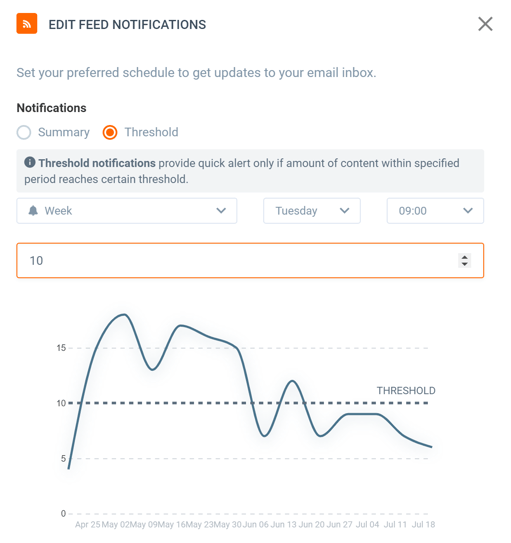
6. In addition, you can set a 'mention threshold' — for example, 10 mentions. A dashed line representing this threshold will appear on the chart, and you will receive a notification each time the threshold is exceeded.
ℹ️ Note: This option may not be available for all types of feeds.
Please note that the notifications are turned off for the newly created feeds so it has to be manually enabled if needed as described above.