
My Space is your personalized, dedicated area within the Digicomply platform. It allows you to quickly access, organize, and administer all your daily workflows and saved content.
How to Access My Space
Simply click on the My Space button located in the top navigation bar from anywhere in the application.

The Sidebar Menu
Once inside, use the left-hand sidebar to navigate through your specific modules:
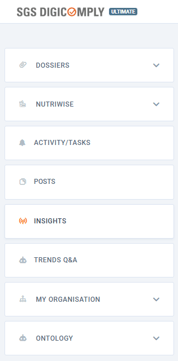
Dossiers
This section allows you to organize, manage, and track all your regulatory documents. You can easily sort them to view all dossiers, those belonging to your organization, or those specifically shared with you.
Nutriwise
Use this area to quickly access and manage your saved product profiles and formulations within the Nutriwise module.
Activity/Tasks
Stay on top of your workflow by tracking tasks and to-dos assigned to you or your team.
Posts
This area acts as your personal library, storing your individually saved regulatory posts and articles for quick retrieval.
Insights
Access your active collaborative workspaces where your team collects, shares, and analyzes regulatory intelligence.
Trends Q&A
Navigate here to review and manage your specific queries and AI-driven answers regarding industry trends.
My Organisation
This administrative hub is where managers can oversee the company profile, team groupings, and user members. It also provides detailed dashboards for monitoring content and user statistics.
Ontology
Designed for internal data management, this section allows authorized users to customize and oversee their organization's specific classification tags and taxonomy.
Discover our new onboarding platform full of video guides - SGS Academy!