
It depends on how you enter the keyword. If you type a word and select it as a simple text match, it will only look for that exact string. However, if you select the term as a Substance (or Product) from the dropdown, the system uses its "Ontology" to automatically capture related synonyms and child terms.
How to Capture All Variations
To ensure your feed catches everything relevant (e.g., catching "herbicides" or specific chemical names when you search for "Pesticides"):
-
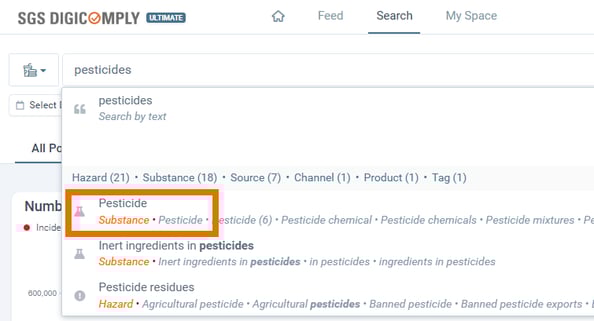
Type the Term: Start typing your keyword (e.g., "pesticides") in the search bar.
-
Select the Entity: Do not just press Enter. Look for the suggestion labeled Substance (or Product) in the dropdown menu and select it.
-
Why? This tells the system you are looking for the concept of pesticides, not just the word.
-
Verifying the Scope
Once selected, you can verify exactly what the system is tracking:
-
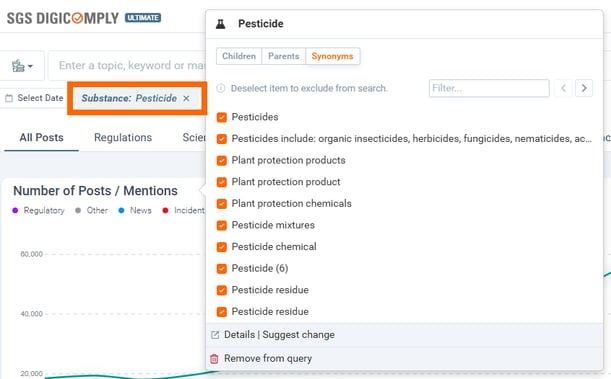
Click the Tag: Click on the gray "Substance: Pesticides" box that appears in your search bar.
-
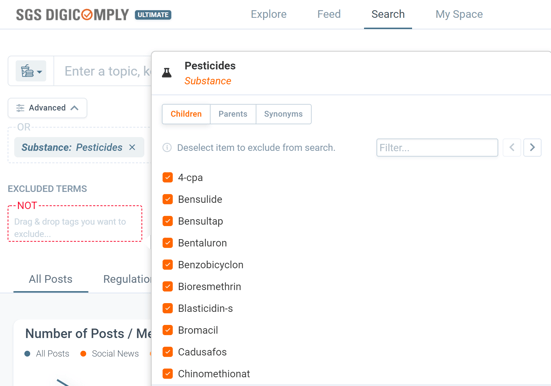
View Relations: A panel will open showing tabs for Children (sub-types), Parents (broader categories), and Synonyms.
-
Example: You will see that by selecting this one tag, you are effectively searching for "Pesticide," "Pesticides," and potentially hundreds of specific chemical names classified under that group.
-
Discover our new onboarding platform full of video guides - SGS Academy!