
Regulatory documents rarely exist in isolation. In SGS Digicomply, the system automatically maps the relationships between documents to help you understand the full context.
Related Posts:
These have a direct legal relationship (e.g., an Amendment is related to the Regulation it modifies).
Similar Posts:
These share strong contextual similarities in content or topic, helping you discover relevant data you might have missed.
How to Access Connected Content
To explore these connections, follow these steps while browsing the Search results:
1. Open the Post - Click on any post title to open the document detail view.
2. Open the Connections Menu - Look for the Chain Link Icon (🔗) located in the right-hand sidebar or the top action toolbar. This is the "Related Post" button.
3. Explore the List - Clicking the icon opens a sidebar listing all connected documents.
-
Navigation: Clicking on any item in this list will automatically redirect you to that specific document.
-
Edit Connections: Note: If you have the appropriate permissions, you may see a pencil icon allowing you to manually link or unlink posts.
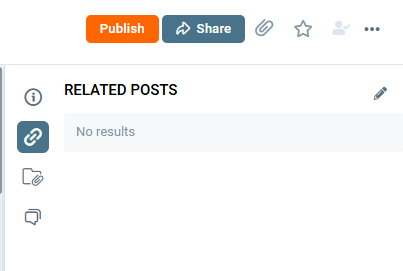
Note: While the screenshot above demonstrates a list of Related Posts, this section will also display Similar Posts if the system identifies content with high relevance to your current document.
Discover our new onboarding platform full of video guides - SGS Academy!