
The search engine offers granular control over how your text queries are interpreted. By using the Search-by-Text filter, you can specify exactly how the system should match your keywords against the database.
Accessing Search Configuration
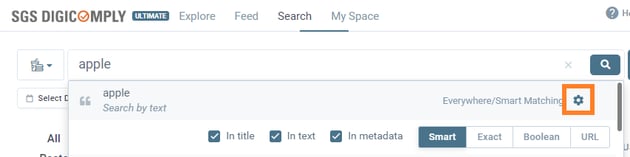
To configure your text search, type your query into the main search bar and look for the Settings (Gear) icon on the right side of the dropdown menu. Clicking this reveals the configuration panel.
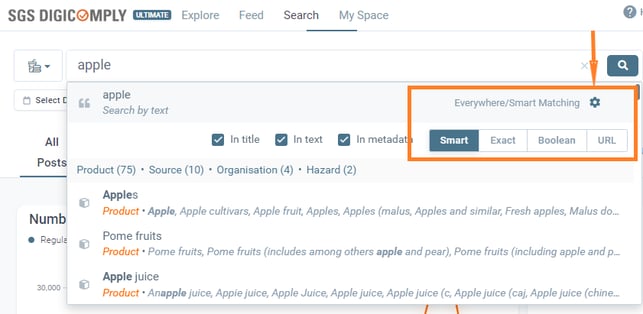
- The configuration consists of 4 Modes

- and 3 Scopes.

Search Modes (How to Search)
You can select one of the following modes to define the matching logic:
-
Smart Search (Default): The best "all-around" option. It uses a fine-tuned algorithm to find the most relevant results by looking for phrases, separate terms, and synonyms. It may return partial matches if they are highly relevant.
-
Exact Search: Finds documents containing the exact phrase you typed, with no variations.
-
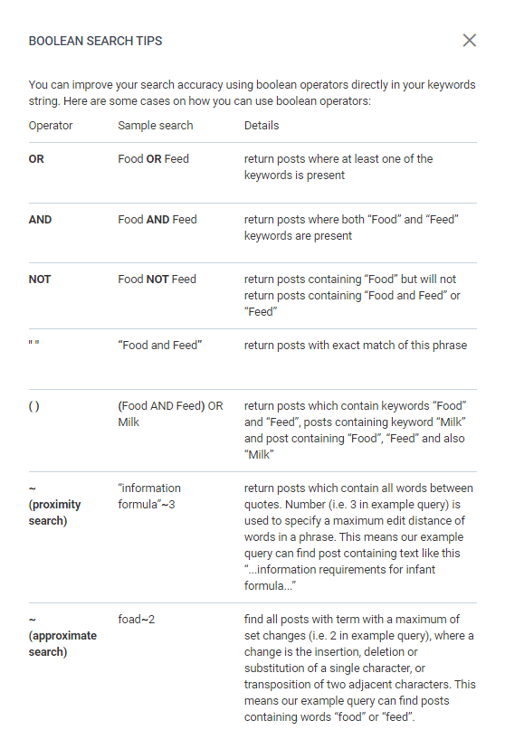
Boolean Search: Allows you to construct complex queries using operators (AND, OR, NOT) and specific syntax rules.
-
URL Search: Useful for finding a specific document if you already have its original source link.
Search Scopes (Where to Search)
You can check or uncheck specific fields to tell the system where to look for your keywords:
-
In Title: Searches only within the document's headline.
-
In Text: Searches within the document's abstract and full body text.
-
In Metadata: Searches within the tags assigned to the document, such as Market categories, Topics, or Sources.
Advanced: Expand Search
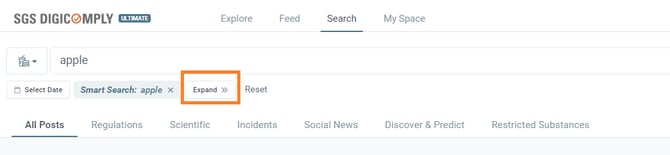
For visual control over your query logic (e.g., changing "AND" to "OR" logic between blocks), you can use the Expand >> button located below the search bar. This is particularly useful for refining complex Boolean queries without typing code manually.
Boolean search:
Boolean search allows users to use complex, long queries with boolean operators.
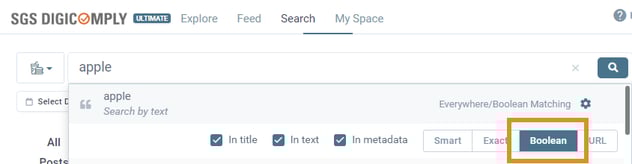
There are several rules that need to be followed to compose a valid boolean query.
RELATED
See this related video in SGS Academy
Discover our new onboarding platform full of video guides - SGS Academy!