
AI-Assisted Search Query Building
When using Search, you can type a natural query into the search bar and click the AI-Copilot button. Based on your input, Digicomply will automatically detect the most relevant search dimensions and apply matching filters for you.
For example, if you enter “recall India” and click the AI-Copilot button, Digicomply will automatically apply the following filters:
- Topic: Alerts and recalls
- Incident: Recall
- Market: India
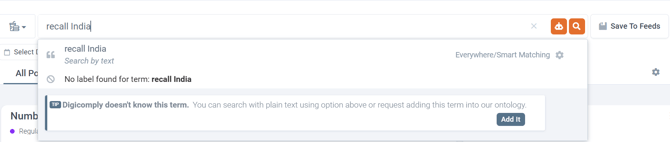

This helps transform a simple natural-language query into a more structured search.
Benefits
-
Faster query creation
You do not need to manually identify and add each relevant filter one by one.
-
More structured search
AI-Copilot translates a simple query into Digicomply filters such as Topic, Incident, and Market.
-
Flexible interpretation
Depending on the query, the applied filters may differ. Some queries may result in only one filter, while others may result in two or more.
ℹ️Remember, the exact filters depend on the content and intent of the query entered into Search.
How to Use
- Open the Search page.
- Type your query into the search bar, for example: recall India.
- Click the AI-Copilot button next to the search icon.
- Review the filters automatically added by the system.
- Adjust or expand the filters if needed.
- Run the search and review the results.
Example Workflows
We prepared a couple of example flows that you can use as inspiration when building your own searches.
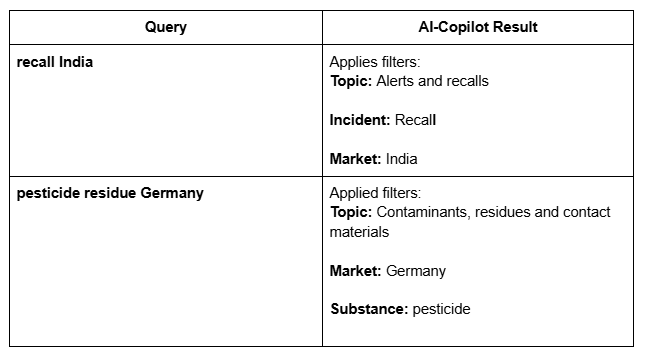
The number and type of filters may vary from one query to another.
Tips for Better Results
Use short, clear queries
Simple phrases often work best, such as 'recall India' or 'salmonella sesame seeds'.
Review the generated filters
AI-Copilot helps you get started quickly, but you should still confirm that the selected filters match your intent.
Refine when needed
You can manually add, remove, or modify filters after AI-Copilot has prepared the search.
Try alternative wording
If the generated filters are not what you expected, rephrase the query and try again.
Best Practice
AI-Copilot for Search works best as a starting point for structured exploration. It helps you move from a natural-language search phrase to a more precise set of Digicomply filters, reducing manual effort and making it easier to find relevant content faster.
The AI does its best to interpret the search intent correctly. However, always review the generated filters and final results, especially when your search is important for decision-making or monitoring critical developments.