
Only users with the Organization Manager role can change who can see a Feed.
A Feed can be personal or organization-wide:
- Personal Feed: Only you can see it. It is listed under My Feeds.
- Organization-wide Feed: People in your organization can see it. It is listed under Organization Feeds.
There are two places where you can change this:
-
in the Update Feed window
-
in the three-dot menu next to a Feed
Make Your Personal Feed Visible to the Organization
Use this when you have a Feed under My feeds and you want your organization to see it.
Option 1: Use Update Feed
- Open the Feed you want to change.
- Click Edit Feed details.
- Click Update Feed.
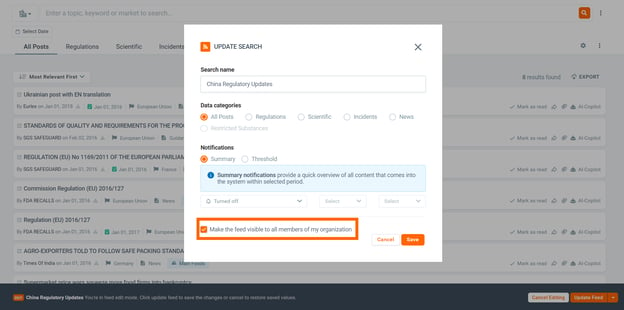
- In the Update Search window, tick 'Make the feed visible to all members of my organization'.
- Click Save.
👉The Feed is now organization-wide, it moves to Organization Feeds.
Option 2: Use the Three-Dot Menu
- Go to My Feeds.
- Find the Feed you want to share.
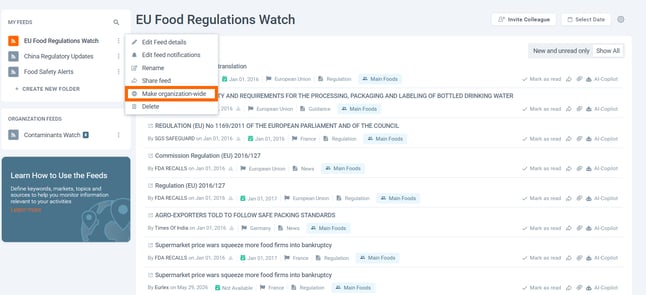
- Click the three dots next to the Feed name.
- Click Make organization-wide.
👉The Feed moves from My Feeds to Organization Feeds.
Make an Organization-Wide Feed Personal
Use this when a Feed under Organization Feeds should be visible only to you.
Option 1: Use Update Feed
- Open the organization-wide Feed you want to change.
- Click Edit Feed details.
- Click Update Feed.
- In the Update Search window, untick 'Make the feed visible to all members of my organization'.
- Click Save.
👉The feed is now personal, it moves to My Feeds. Other organization members will no longer see it.
.png?width=614&height=317&name=jugu).png)
Option 2: Use the Three-Dot Menu
- Go to Organization Feeds.
- Find the Feed you want to make personal.
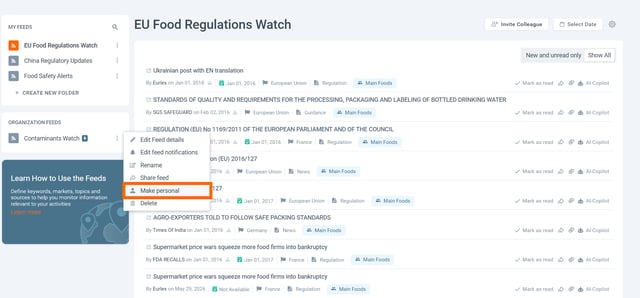
- Click the three dots next to the feed name.
- Click Make personal.
👉The Feed moves from Organization Feeds to My Feeds.
If You Do Not See These Options
- Ask your Organization Manager for help.
- You may not have permission to change Organization Feeds.
- Your license may not include Organization-wide Feeds.
ℹ️Changing who can see the Feed does not change the Feed search, name, or notifications.
Discover our new onboarding platform full of video guides - SGS Academy!