
SGS Digicomply automatically manages version control for all dossiers. This ensures that every change is tracked and that you always have a clear record of the document's history. The system operates on a strict Draft vs. Released logic.
How Versioning Works
-
Single Active Version: Only one version of a dossier can have the status "Released" at any given time. This is the "official" version visible to readers.
-
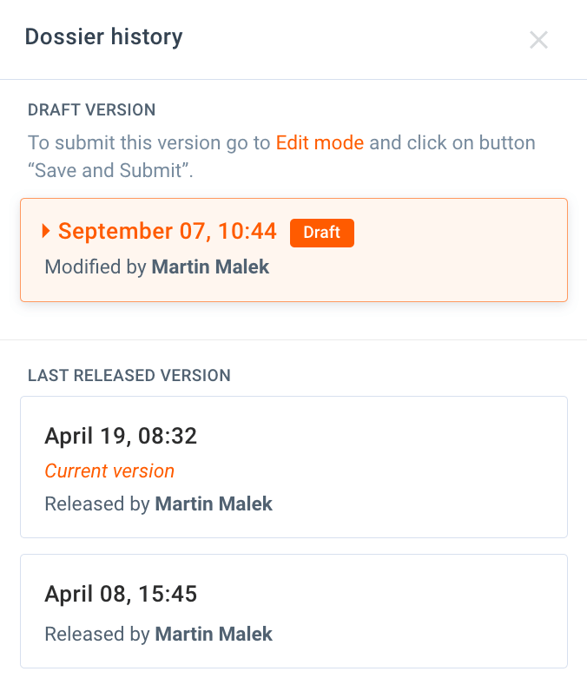
Editing Creates Drafts: As soon as you edit a Released dossier, the system automatically creates a new version with the status "Draft".
-
Finalizing: The Draft remains a work-in-progress until you explicitly decide to Release it, at which point it becomes the new current version.
Example Scenario
Imagine you have a released dossier on "Japan Regulatory Analysis".
- Trigger: A pinned regulation within the dossier is updated by the authorities.
- Action: You open the dossier to update your analysis.
- Result: The system creates a new Draft version. You can work on this draft for days without affecting the view for other users.
- Release: Once finished, you publish the draft. It replaces the old version as the "Current" document.
Version History & Restoration
You are never locked into a mistake. At any point, you can browse the full history of the dossier.
-
View History: Access the version log to see who made changes and when.
-
Restore: You can revert the dossier to any previous version if needed.
Note: In the dossier history list, the active, published document is always marked with the label Current version.
Discover our new onboarding platform full of video guides - SGS Academy!