
The "Active Monitoring" Principle
SGS Digicomply actively tracks the regulatory documents you use. However, for the system to notify you of a change, you must first establish a link to the document.
You will only receive update notifications for content that you have Pinned to a Dossier.
Visual Indicators in the Dossier
When you open a Dossier, the system automatically checks the status of every pinned reference. If a change is detected, it is flagged visually in the reference list.
The Warning Icon (⚠️): An orange warning triangle with an exclamation mark appears next to any reference that has been modified since you last pinned it. This indicates that the text of the regulation has changed, or a new version has been published.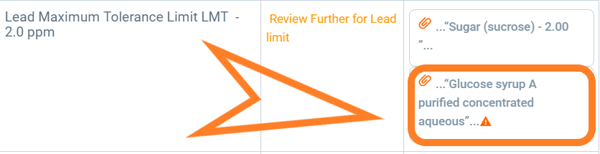
Status Labels: In addition to the warning icon, look for changes in the document's metadata status. The system will indicate if the regulatory lifecycle has shifted, such as:
-
Amended: Small changes have been made to the text.
-
Repealed/No Longer in Force: The regulation has been replaced or is no longer active.
-
New Version Available: A completely new iteration of the document exists.
Notification Channels
You do not need to open the Dossier every day to check for orange icons. The system pushes alerts to you through two other channels:
-
In-App Alerts (The Bell Icon): Check the notification bell in the top navigation bar. The system generates an alert listing which specific Dossier and which specific Pin has been updated.
-
Email Digests: Depending on your notification settings, you may receive an email summary highlighting significant changes to your tracked topics and dossiers.
Discover our new onboarding platform full of video guides - SGS Academy!