
Food additive limits are a distinct dataset within the Restricted Substances Database. Because they represent "usage permissions" rather than "contaminant thresholds," they have their own dedicated category and specific data structure.
Accessing the Search Tool
-
Navigate to the Restricted Substances page from the main Search menu.
- Mandatory Step: Before you can see the "Food Additives" category, you must enter at least one of the following search parameters:
-
-
Market: (e.g., European Union)
-
Product: (e.g., Soft drinks)
-
Substance: (e.g., Advantame)
-
Activating the Category Filter
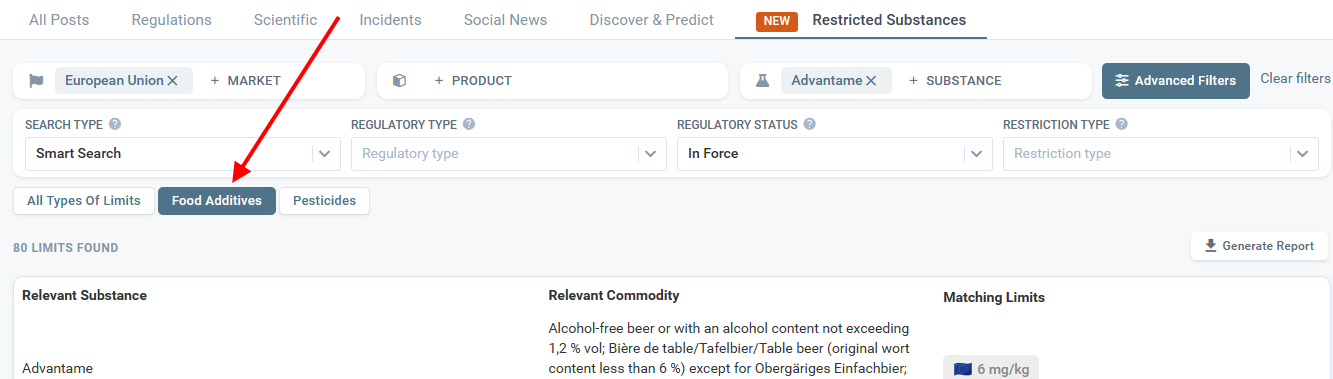
Once you have entered your initial criteria (e.g., Market = EU), the system will display a row of "Category Filters" above the results table.
-
Action: Click on the Food Additives button to filter the results exclusively for additive usage limits.
Interpreting the Results
The search results table will display:
-
Relevant Substance: The additive name (e.g., Advantame).
-
Relevant Commodity: The specific food category where it is permitted (e.g., Alcohol-free beer).
-
Matching Limits: The numeric limit (e.g., 6 mg/kg) or "GMP" (Good Manufacturing Practice).
Viewing Specific Conditions (Notes)
Food additive regulations often come with complex conditions (e.g., "Only for use in energy-reduced products").
-
How to view: Click directly on the Limit value or the GMP text in the results table.
-
Result: A detail panel will open displaying the full Notes, additional conditions, and a direct link to the underlying regulation.
⚠️The feature is available to PRO users only.
Discover our new onboarding platform full of video guides - SGS Academy!